
Parivahan Sewa Guide 2025 : Website, Login & Portal
Parivahan Sewa is the official online portal of the Government of India’s Ministry of Road Transport and Highways (MoRTH) which is designed to simplify vehicle and driving-license related services across India.
On its public dashboard: the total number of vehicles registered via its system reaches about 41.12 crore (411.2 million). The platform has processed 53.69 crore (536.9 million) applications overall. For driving-licenses, the count issued so far is 22.53 crore (225.3 million).
Parivahan Sewa lets users do many things online: apply for or renew a driving license, register a new vehicle or check vehicle details, transfer ownership, pay road tax, check e-challans, get or renew permits, and more all without visiting a Regional Transport Office (RTO). By bringing these services online under a unified digital system which is Parivahan Sewa it reduces paperwork, saves time, and improves transparency.
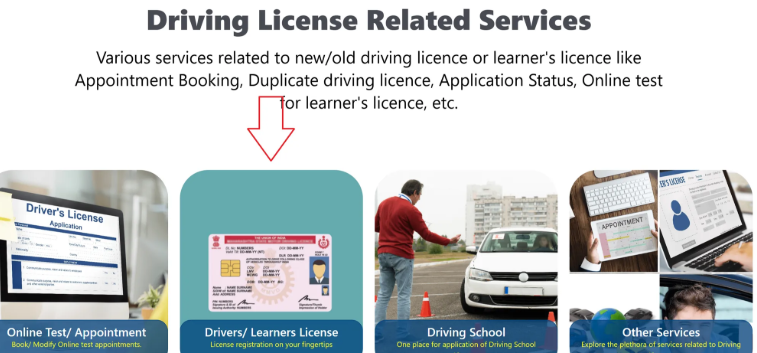
Driver License Related Services Parivahan Sewa
Parivahan Sewa offers several licence-related services such as you can apply online for a new learner’s licence or permanent driving licence, renew an existing licence, request a duplicate if your licence is lost or damaged, and book test slots. You can also update licence details (such as address), check application status, and download or print your licence copy.
DRIVERS/LEARNERS LISCNECE
Licence Registration, Download ,Apply, Application, Status check
DRIVING SCHOOL
click here for procedure
You can Apply for a Driving School License in one place.

ONLINE TEST OR APPOINTMENT
There is a chance of booking & Modifying your appointment

OTHER SERVICES
Explore More Services which are used for you

DRIVING LICENSE STATUS
Check your driving licese status with full explained steps

SARATHI LOGIN & DASHBOARD
Track your all permit related Documnets
Vehicle Related Services Offered By Parivahan Sewa
Parivahan Sewa provides online vehicle services for all vehicle owners. You can register a new vehicle, download or update your RC, transfer ownership, pay road tax, check vehicle details, renew fitness certificates, apply for permits, and check or pay traffic challans. These services save time and reduce RTO visits.


Parivahan Sewa Overview Table
| Category | Details |
|---|---|
| Purpose | Provides online transport services and information for citizens across India. |
| Managed By | Ministry of Road Transport and Highways (MoRTH), Government of India. |
| Main Services | Driving Licence, Learner Licence, Vehicle Registration, Permit Services, Challan Payment, Fitness Certificate, Ownership Transfer. |
| Key Features | Online applications, status tracking, document verification, fee payment, slot booking. |
| Licence Services | Apply LL, DL, Renewal, Duplicate Licence, International Driving Permit, DL Test Slots. |
| Vehicle Services | Registration (RC), Duplicate RC, Hypothecation, Address Change, Ownership Transfer. |
| Challan Services | View challans, pay fines, track challan status. |
| Permit Services | National Permit, Temporary Permit, Goods & Passenger Vehicle Permits. |
| Digital Tools | mParivahan App, Digilocker, Aadhaar verification. |
| Who Can Use | Citizens, drivers, vehicle owners, transport operators, businesses. |
| Benefits | Saves time, reduces RTO visits, faster processing, transparent system. |
| Official Website | https://parivahan.gov.in/ |
| Availability | All Indian states and union territories. |
How to Download Your Driving Licence From Parivahan Sewa
Go to the official portal
Open a web browser and visit the official site of Parivahan: start at Sarathi Parivahan via sarathi.parivahan.gov.in. Then navigate to the “Online Services → Driving Licence Related Services” section.
Select your state
On the page, first choose the state from which your licence was issued. This ensures you’re accessing the correct regional RTO database.
Choose “Print / Download Driving Licence”
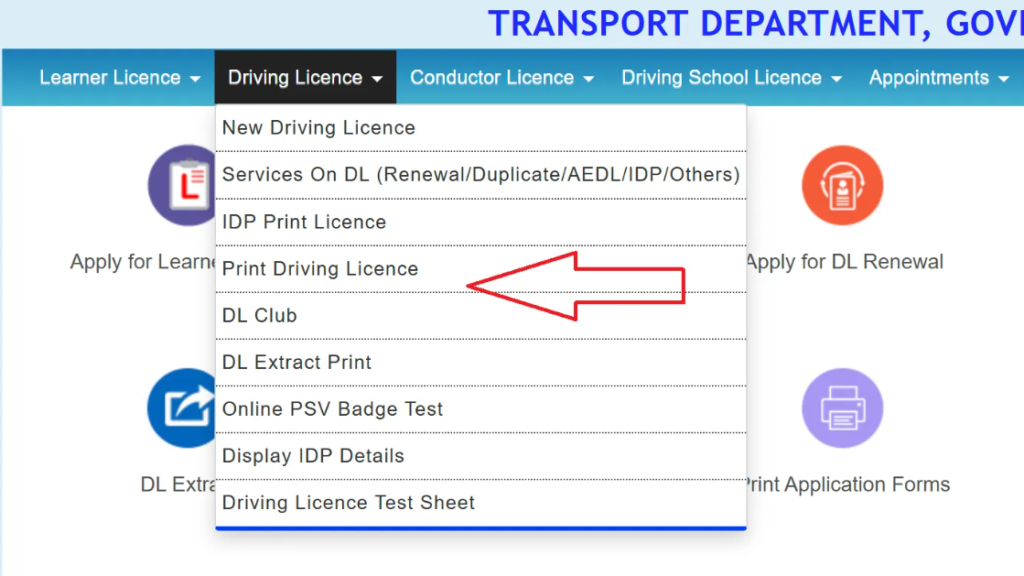
Under the Driving Licence menu, click on the option labeled “Print Driving Licence” (or similar wording — sometimes “Download DL / Print DL”).
Enter required details
You will be asked to provide your Driving Licence number (or application number) and your Date of Birth. Enter these correctly, then submit.
Download or print the licence
Once the portal retrieves your record, your licence will appear. Then click on the option to download or print
this will give you a PDF copy of your licence. You can save it on your device or print a physical copy.
How to Apply for Learner’s Licence via Parivahan Sewa
- Visit the official portal
Open your browser and go to the official site: sarathi.parivahan.gov.in (the portal of Parivahan Sewa / Sarathi). - Select your state
From the drop-down list, choose your state (e.g. Andhra Pradesh). It’s important because the RTO jurisdiction and required procedures may vary by state. - Choose “Apply for Learner Licence”
On the licence-service page, click on the option labelled “Application for New Learner Licence” (or equivalent).
- Fill out the application form
Enter required details such as your name, address, date of birth, contact details, and select the vehicle class (motorbike, LMV, etc.). - Upload required documents
Upload scanned copies of your proof of age, proof of address, and a passport-size photograph. Some categories may also require a medical certificate (especially for certain vehicle classes). - Pay the application fee online
Pay the prescribed fee for learner licence application. Fee amount may vary by state. - Book a slot for the Learner Licence test (if required)
After submission and fee payment, book a date/time slot for your Learner-Licence test. Some states allow an online theory test, while others may require you to appear in person at the RTO. - Appear for the test
On the scheduled date, go to the RTO (or online, depending on your state) and take the test. The test usually checks your knowledge of traffic rules, road signs, and basic driving regulations. - Receive your Learner’s Licence
If you pass the test and your documents are verified, the RTO will issue your Learner’s Licence. The licence is typically valid for six months from the date of issue. - Use the LL for practice driving (with conditions)
Once you have the Learner’s Licence, you are allowed to practice driving — following the rules for learner-drivers (like displaying “L” sign, accompanied by a licensed driver when required) until you apply for a full licence.
Steps to Check Driving Licence Status Online
- Open your browser and go to the official Parivahan Sewa website (or the related portal for licences).
- From the homepage, navigate to “Online Services → Driving Licence Related Services”.
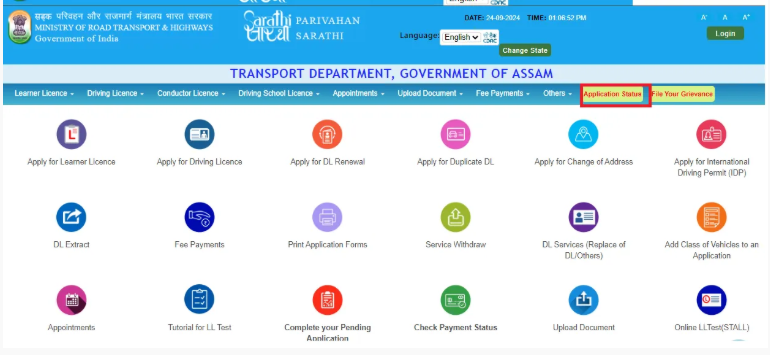
- Select your state (e.g. Andhra Pradesh) — this ensures the right Regional Transport Office (RTO) database is accessed.
- Click on “Application Status” (or similar option) from the menu.
- Enter the details the site asks for — usually your application number (given when you applied), your date of birth, and sometimes a captcha code.
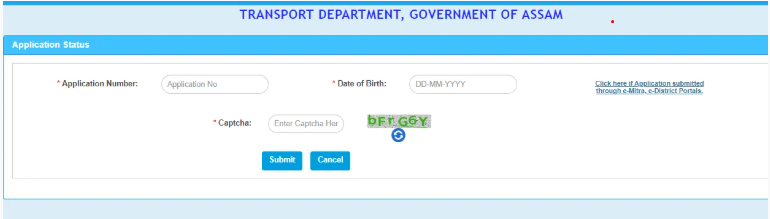
- Press “Submit” or “Check Status.” The page should display where your licence stands — for example: “Under Process,” “Approved,” “Dispatched,” or any other relevant status.
Steps to Download Driving Licence
- Open the official portal
Go to the official Parivahan website: visit parivahan.gov.in → then navigate to “Online Services → Driving Licence Related Services.”
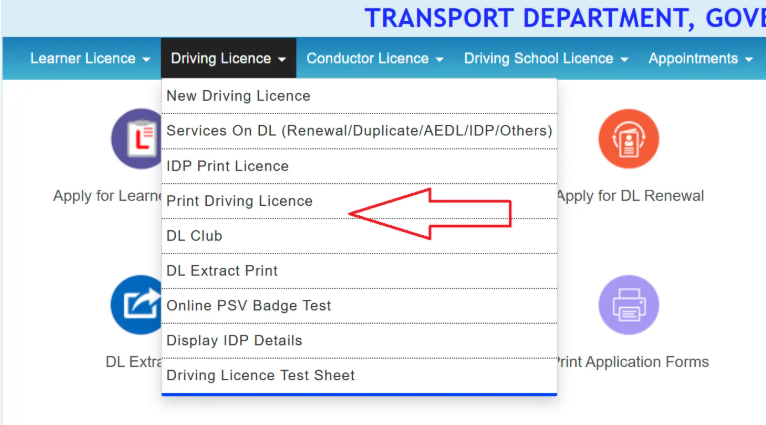
- Select your state
Choose the state in which your licence was issued (e.g. Andhra Pradesh). This opens the state-specific Sarathi dashboard. - Choose “Print Driving Licence”
On the dashboard, under Driving Licence menu, click on “Print Driving Licence” (or equivalent) for permanent DL. For a Learner Licence, choose “Print Learner’s Licence (Form-3)”. - Enter required details
Provide your DL number or Application Number, Date of Birth, and if prompted, complete captcha/OTP verification. - Submit → View DL → Download / Print
After submission, the licence record will display. Then click “Print / Download” — this will give you a PDF copy of your DL which you can save or print for physical copy.
Steps to Apply for Duplicate DL (Online via Parivahan)
- Visit the official portal of Parivahan Sewa go to sarathi.parivahan.gov.in
- Select your state (for example, Andhra Pradesh), so that you are routed to your local RTO database.
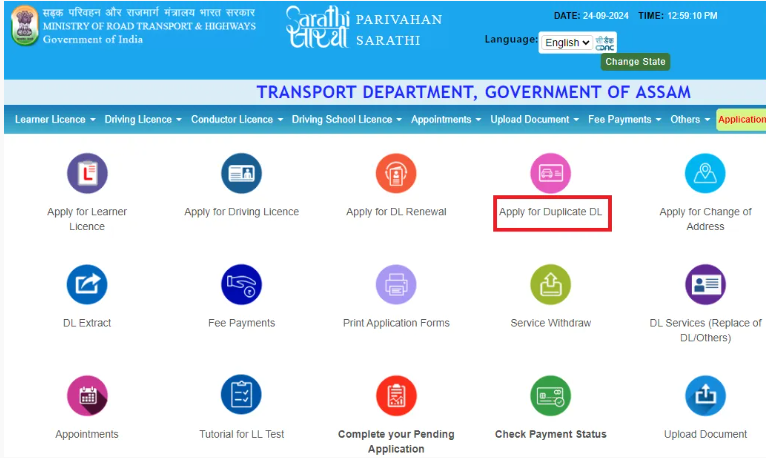
- In the menu, choose “Driving Licence → Services on DL (Renewal / Duplicate / Others)”.
- Click on “Apply for Duplicate DL” (or “Issue of Duplicate DL”).
- Enter your licence number, date of birth, and any other required details — click “Get DL Details” to fetch your licence record.
- Provide required information: contact details (mobile, address, pin-code), reason for duplicate (loss/damage), etc.
- Upload required documents: identity proof, address proof, FIR if licence lost, copy/photo of DL if damaged, passport-size photos.
- Pay the required fee (as prescribed by your state / RTO).
- After payment, print or save the receipt/acknowledgement.
- Some RTOs may require you to schedule an appointment for document verification — if required, choose a convenient slot. Then visit RTO in person to submit documents and fee slip.
- Once verified and processed, you will receive your Duplicate Driving Licence — either by post or by collecting from RTO (depending on RTO’s procedure).
How to Renew Driving Licence
- Go to the official portal
Visit the Parivahan / Sarathi portal (usually via parivahan.gov.in → “Online Services → Driving Licence Related Services”). - Select your state
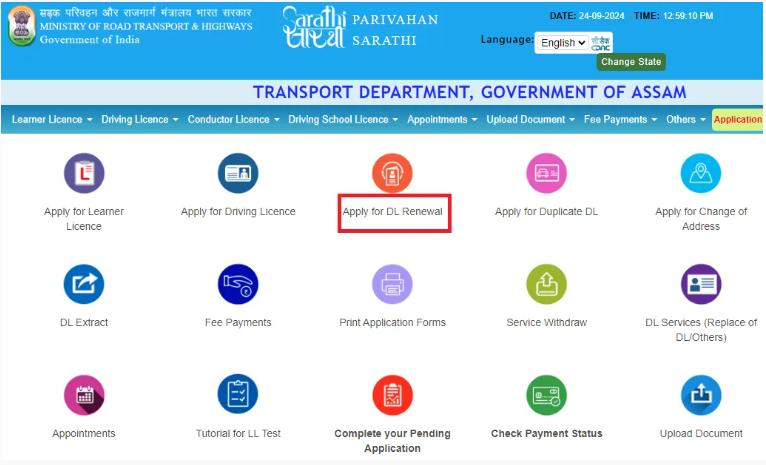
Choose the state where your licence is registered (e.g. Andhra Pradesh). This ensures you are routed to the correct RTO database. - Click “Apply for DL Renewal”
From the DL-services menu choose the renewal option (often under “Services on Driving Licence (Renewal/Duplicate/Others)”).
- Enter your licence details
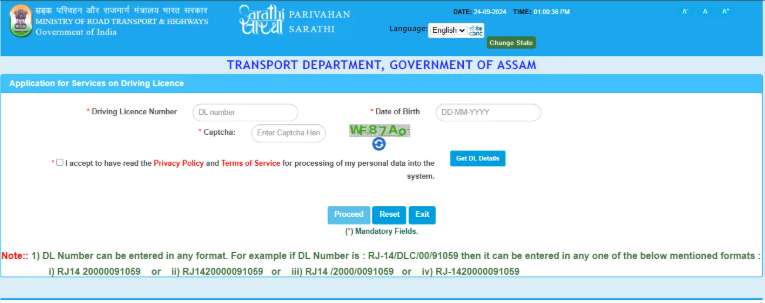
Provide your Driving Licence number, Date of Birth, and any other required info. Then click “Get DL Details” (or similar) to fetch your licence record. - Upload required documents (if required)
For renewal, you may need to submit certain documents: your existing DL copy, proof of address, and photo. Some cases — like transport-vehicle licences or elderly drivers — may also require a medical certificate.
- Pay renewal fee
Pay the prescribed fee. For example, in Andhra Pradesh renewal fee is typically ₹200, though late renewals or renewals after grace period may cost more. - Submit application & get acknowledgement
Once submitted, you’ll get an acknowledgement receipt. Keep it for reference / tracking. - Schedule appointment (if required)
For some RTOs, you may need to schedule a slot for verification or biometric / document-check at the local RTO office. - Receive renewed licence
After verification, the renewed licence will be issued — depending on state: possibly by post or for pickup at RTO
Driving Licensing Related Fees and Charges
| Service / Purpose | Fee / Charge (₹) |
|---|---|
| Learner’s Licence (per class of vehicle) | 150 |
| Learner’s Licence test (or repeat) | 50 |
| Competence-to-drive test (for permanent licence, per class) | 300 |
| Issue of new Driving Licence (permanent DL) | 200 |
| Driving Licence Renewal (on time) | 200 |
| Duplicate Driving Licence (if original lost / damaged) | 100–200 (commonly 200) |
| Addition of another vehicle-class to existing DL | 500 |
| International Driving Permit (IDP) / Driving Licence for abroad travel | 1,000 |
| Changing address / updating licence details | 200 |
Step-by-Step: How to Pay eChallan Online
- Go to the official portal
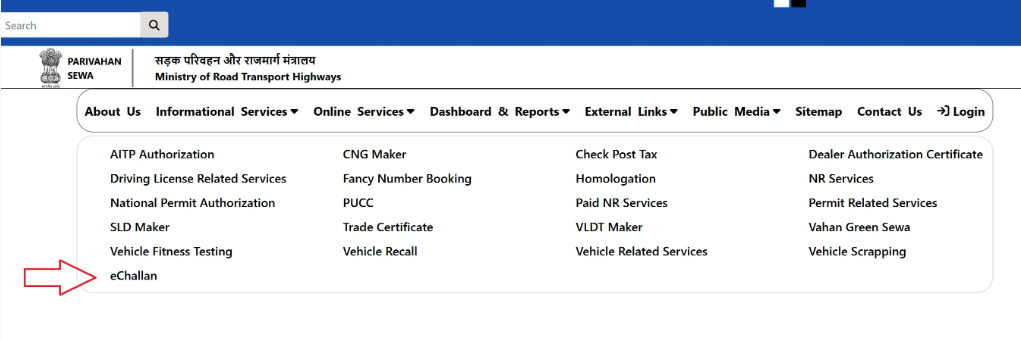
- Open your browser and visit the official eChallan website (run by Ministry of Road Transport and Highways / Parivahan): use the link for “Accused Challan / Pay Challan”.
- You can also check challan status before paying.
- Enter vehicle / challan details
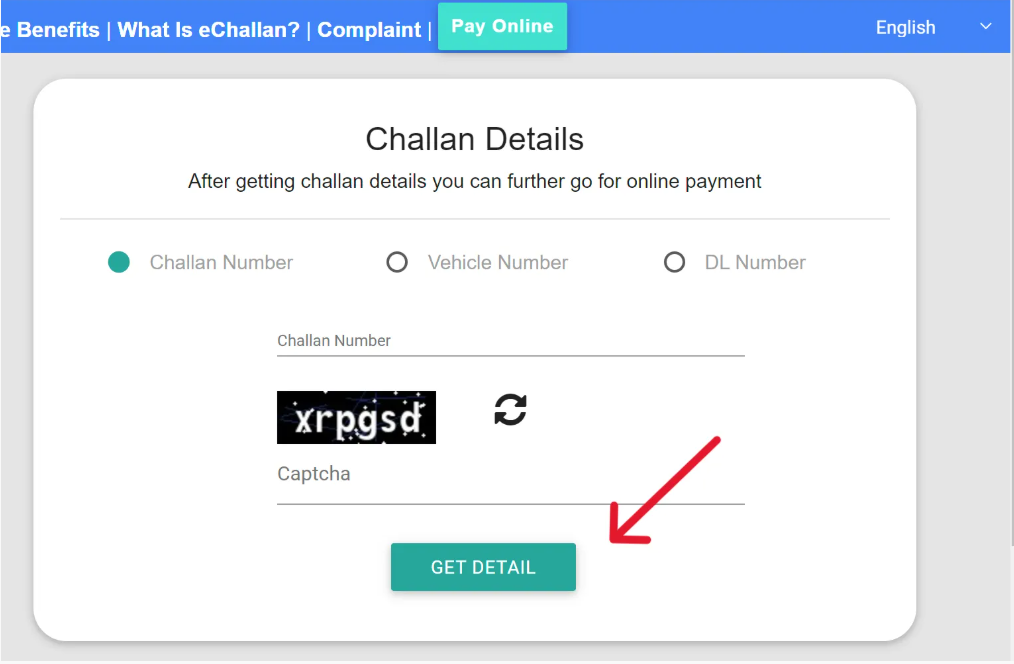
- On the portal, choose either your vehicle registration number, driving-license number, or challan number as required.
- Enter the captcha (security code) if prompted, then click on “Get Detail / Get Challan Details” to view any pending fines.
- Check challan information
- The portal will show you the list of pending challans (if any), including offence details and fine amount.
- Confirm that the offence and amount are correct before proceeding.
- Click “Pay Now” / “Pay Online” for the selected challan
- After selecting the challan, click on the “Pay Now” (or similar) button to proceed to payment.
- Choose your payment method and pay
- The portal lets you pay via net-banking, debit/credit card, UPI or other accepted online modes.
- If payment is successful, you’ll get a confirmation (often a transaction ID or receipt).
- Save or download receipt
- It’s a good idea to save or take a screenshot of the payment receipt — you may need it as proof if questioned by traffic police or authorities.
Services Offered by Parivahan Sewa
Parivahan Sewa provides a wide range of online transport services for citizens, drivers, vehicle owners, and transport businesses across India. These services help reduce visits to the RTO and make transport processes quicker and more transparent. Below is an easy overview of the major services offered.
Driving Licence Services
Parivahan Sewa offers complete online support for all driving licence related tasks. Users can:
• Apply for a Learner Licence
• Apply for a new Driving Licence
• Book Driving Test Slots
• Renew existing Driving Licence
• Apply for Duplicate Licence
• Change address on Licence
• Apply for International Driving Permit
• Check DL status and download digital licence
Vehicle Registration Services
Users can complete many Registration Certificate (RC) related tasks online. These include:
• New vehicle registration
• Duplicate RC
• RC renewal
• Hypothecation addition or removal
• Change of address in RC
• Transfer of vehicle ownership
• Temporary registration details
• Registration status check
Challan and Traffic Fine Services
Parivahan Sewa allows users to:
• View traffic challans
• Pay challan fines online
• Check pending challans
• Download challan receipts
This helps users process fines quickly without visiting any office.
Vehicle Fitness and Permit Services
For commercial vehicles, Parivahan Sewa provides:
• Vehicle fitness certificate application and renewal
• Appointment booking for fitness examination
• Goods and passenger vehicle permits
• National and temporary permits
• Permit renewal and status updates
Tax and Fee Payment Services
Users can pay various transport taxes and fees online, including:
• Road tax payments
• Green tax
• Permit fees
• Fitness-related fees
• Licence and registration fees
Online Document Verification
Parivahan Sewa supports:
• Aadhaar-based verification
• Digilocker license and RC download
• mParivahan digital documents
These tools allow citizens to carry paperless digital documents.
Vehicle Information and Status Check
Users can check:
• RC details
• DL details
• Vehicle owner information
• Insurance validity
• PUC status
• Blacklisted vehicle status
Transport Services for Businesses
Parivahan Sewa also supports transport operators and companies by offering:
• Fleet management services
• Bulk permit applications
• National permit renewal
• Compliance updates
• Vehicle database access
Grievance and Support Services
Users can raise complaints or track issues related to:
• Licence delays
• RC corrections
• Challan disputes
• Portal errors or failed payments
This helps ensure faster resolution through official channels.
Help Desk For Parivahan Sewa
| Service / Scope | Contact Number / Email / Timing |
|---|---|
| General / All-India Helpline | 0120-492 5505 |
| Driving Licence / Learner Licence enquiries | 0120-245 9169 |
| Vehicle registration, RC, tax, permits, fitness, etc. | helpdesk-vahan@gov.in |
| eChallan / Traffic-fine related support | helpdesk-echallan@gov.in |
| mParivahan app support | helpdesk-mparivahan@gov.in |
| Website technical / feedback issues | wim.rth@nic.in |
| Support hours (general) | 6:00 AM – 10:00 PM (for the main helpline number) |